FILMING & TRAVEL POWER / MY GEAR
DJI wireless mics for CarveCast
How I’d set up clear voice on a windy lift, in a boot room or on a ski trip.
The microphone is its own piece of kit
A camera can give you a beautiful shot and still leave you with speech you can barely hear. For a piece to camera or conversation I want a mic close to the person speaking. On a ski trip that usually means figuring out where it can clip without being rubbed by a jacket, zip, strap or neck warmer.
How I’d test it
I’d record ten seconds with the jacket and the rest of the kit in the position I will wear it. Walk, turn your head and move your arms. Listen back for wind and clothing noise. Fit the windscreen outside and check the camera is hearing the mic you intend to use before asking someone to repeat an answer.
Match the connection to the camera
DJI has several Mic models and the connection and backup options vary. Check whether your transmitter connects directly to your camera or needs its receiver. If your model can record internally, learn how to turn that on before an interview. It gives you a separate recording if the camera feed drops out.
A conversation needs more than a loud recording
If two people are speaking, think about both voices before the conversation begins. One microphone close to one person does not automatically give equal clarity to the person standing beside them. Check the receiver or camera setup, identify which transmitter belongs to whom and listen to each voice separately.
I would also check the sound when both people move naturally. A transmitter that is quiet when everyone stands still can rub against a jacket as soon as someone turns to point at a boot or a ski. A small placement adjustment before the interview can save an explanation that would be difficult to repeat.
Know which DJI Mic you are using
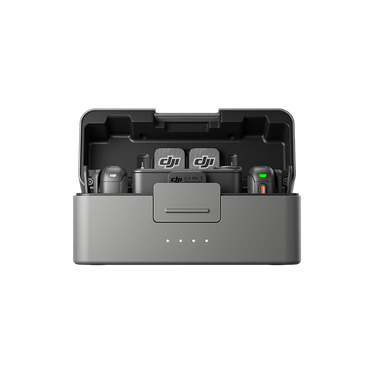
The picture here shows Mic 3 as an example of the DJI range. Its official description includes internal 32-bit float recording and timecode, but those features should not be assumed for every DJI transmitter. Check the model and the connection guide linked below. Internal recording, when available and enabled, is a useful separate source to retain alongside the camera audio.
I would label and copy the sound files with the video from the same session. Keep the originals until the edit is finished and checked. Noise reduction can help in an edit, but it is much better to get a clean voice close to the microphone than rely on processing to rescue wind and fabric noise.